How to Tell If Someone Unfollowed You on Instagram
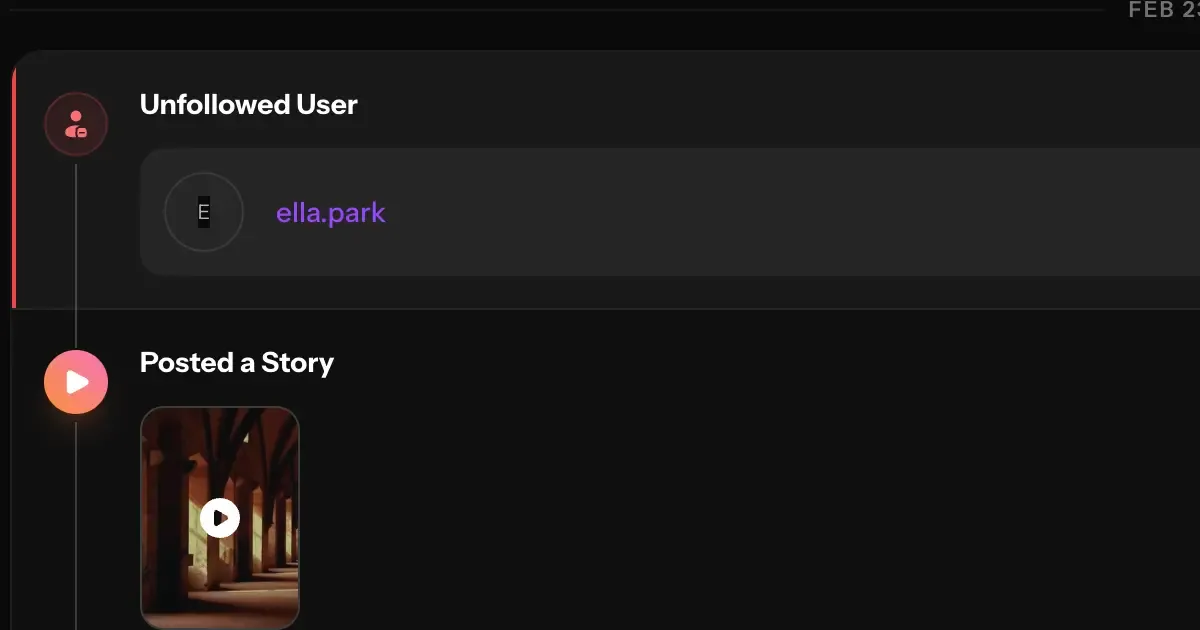
Instagram never tells you when someone unfollows you. No notification, no alert, nothing. One day someone is in your follower list, the next they're gone — and you'd never know unless you were actively checking.
If you've been wondering whether a specific person still follows you, or you want to track unfollows automatically going forward, here's exactly what you can do.
Does Instagram Notify You When Someone Unfollows You?
No. Instagram does not send any notification when someone unfollows you. This is intentional — Instagram has never offered this feature natively, and there's no setting to enable it.
The only way to find out is to check manually, or to use a third-party tool that tracks your follower count over time and flags when someone drops off.
How to Tell If a Specific Person Unfollowed You
The simplest method: go to their profile and check whether the "Follows you" label appears under their username. If it's not there, they don't follow you.
This works fine if you have one specific person in mind. It doesn't scale if you want to know who among all your followers has unfollowed you — Instagram gives you no way to compare your current follower list against a previous snapshot.
How to Track Unfollowers Automatically
This is where a third-party tool becomes necessary.
With InstaRadar's premium plan, you can monitor any public Instagram profile over time and track changes to their follower list. When someone unfollows a profile that InstaRadar is tracking, it gets logged as an activity event and you get notified automatically.
You can view any public profile's current followers and following list for free on InstaRadar — but automatic activity tracking and unfollow detection require a premium plan.
There's one important limitation worth being upfront about: InstaRadar can only detect unfollows that happen after you start tracking a profile. There's no way to reconstruct historical follower data from before tracking began. If someone unfollowed you six months ago, that won't appear — only changes that happen from the moment tracking starts will be recorded.
Get Notified When Someone Unfollows You
With InstaRadar's premium plan, you get full activity tracking including automatic unfollow detection and notifications. When a tracked profile loses a follower, you'll get an alert — so you don't have to check manually.
This is useful if you're monitoring your own account and want to know in real time when your follower count drops, or if you're keeping an eye on a specific public profile's audience changes.
What You Can (and Can't) Know
You can find out:
- Whether a specific person currently follows you (manual check on Instagram)
- Who unfollowed a profile after you started tracking it on InstaRadar (premium)
- When the unfollow happened (approximate timing)
- Get automatic alerts for future unfollows (premium)
You cannot find out:
- Who unfollowed you before you started tracking
- Unfollowers on private accounts you don't follow
- Historical unfollow data from before InstaRadar began monitoring the profile
This is a hard limitation — not specific to InstaRadar, but to how Instagram's API works. No tool can accurately reconstruct past follower history that was never recorded.
Why Does Instagram Hide This?
Instagram has never explained why unfollow notifications aren't a native feature. The most likely reason: knowing exactly when and who unfollows you tends to create anxiety and conflict, which Instagram would rather avoid facilitating directly.
The data is technically accessible — Instagram just chooses not to surface it in the app. That's the gap third-party tools fill.
Frequently Asked Questions
Can someone tell if I unfollowed them?
Not through Instagram — Instagram sends no notification. They would only find out if they checked your profile manually or used a tracking tool like InstaRadar on their own account.
Does InstaRadar show me who unfollowed me in the past?
No. InstaRadar can only track changes that happen after monitoring begins. Past unfollow history is not recoverable — this applies to any tool, not just InstaRadar.
Can I track someone else's unfollowers, not just my own?
Yes. InstaRadar works on any public Instagram profile, not just your own. You can monitor any public account's follower activity, including when they lose followers.
How quickly does InstaRadar detect an unfollow?
InstaRadar checks tracked profiles regularly. Detection is not instant — there's typically a delay of a few hours depending on how recently the profile was last scanned.
Is the unfollow tracker free?
Unfollow tracking requires a premium plan. You can view any public profile's current followers and following list for free — but activity tracking and unfollow notifications are premium features.
The Bottom Line
Instagram won't tell you when someone unfollows you — and there's no way to change that inside the app. If you want to know who recently unfollowed a profile, the only practical option is a tool that monitors follower changes over time.
InstaRadar tracks public profile activity and alerts you when unfollows happen — so you're never in the dark again. Just keep in mind that tracking only captures changes from the moment you start, not before.
Related articles

How to See Who Someone Recently Followed on Instagram
Instagram no longer shows followers in chronological order — but there's still a way to check. Here's exactly how to see who someone recently followed.
Does Instagram Show Followers in Chronological Order?
Instagram used to sort followers chronologically — but that changed. Here's what actually happens to your follower list today, and how to get the order back.